iOS & iPadOS Application

Gate 90

Know your Schengen days before the border does. Days left, your latest exit date and a forecast calendar for the 90/180 rule, plus ETIAS and passport tracking. Offline, no account.

Download Gate 90 on the App Store

Coming Soon

Gate 90 App Icon
Overview

Why Gate 90?

The Schengen rule sounds simple: 90 days in any 180. In practice the window rolls every day, old trips drop out while new ones count, and a single miscounted day can mean an overstay record. Spreadsheets and quick web calculators rarely tell you the one thing you need: the last day you can legally stay.

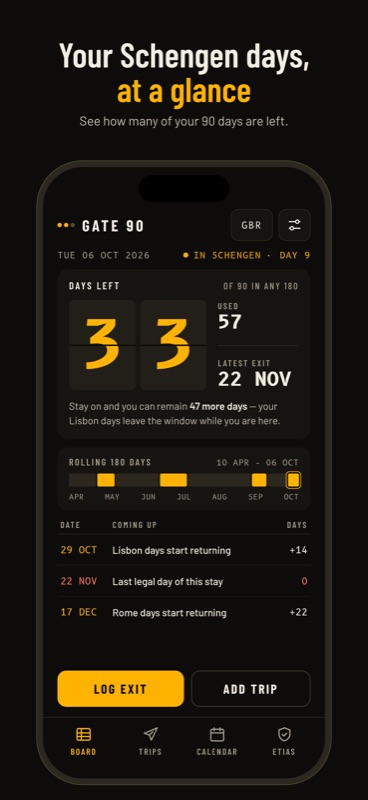
How it works: add your trips once. Gate 90 shows how many days you have used and have left today, the latest exit date if you stay on, and exactly when older days start returning. The calendar forecasts your allowance on any future date, so you can plan the next trip before you book it.

Built natively for iPhone and iPad, following the European Commission's short-stay method. Everything works offline, and your trips and documents stay on your device.

Features

What You Get

🛂 Days Left and Your Latest Exit

A split-flap board with days left, days used and the last legal day of your current stay. The latest exit checks every future day instead of just adding your remaining allowance to today.

📅 A Calendar That Forecasts

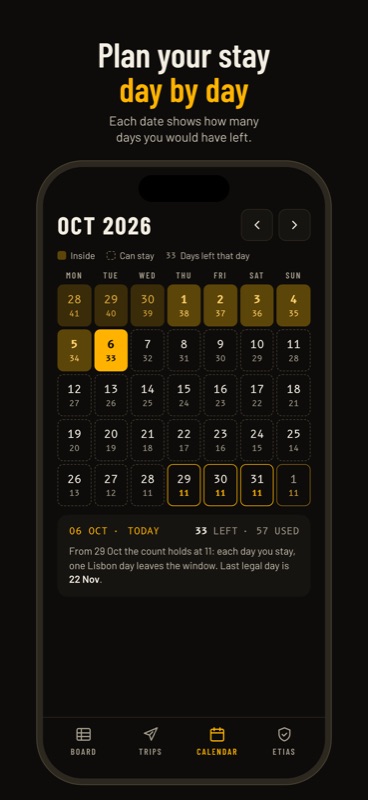
Every date shows how many days you would have left, with recorded and projected days marked. See when days start returning and plan the next trip with confidence.

✈️ Trips That Count Correctly

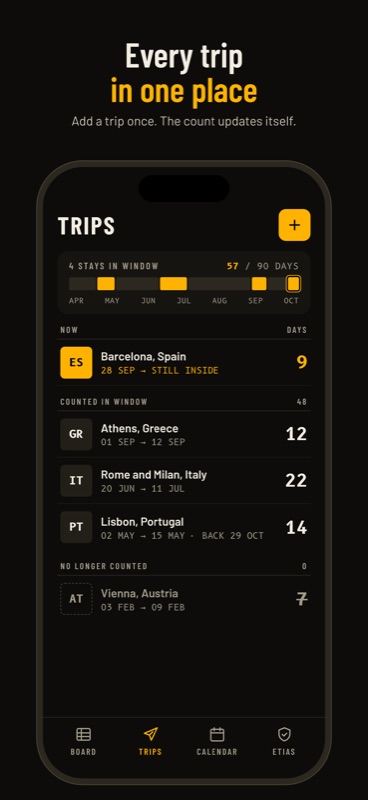
Both arrival and departure days count, overlapping trips count once, and future trips never reduce today's total. Trips are grouped into now, counted in the window and no longer counted.

🪪 ETIAS, EES and Passport

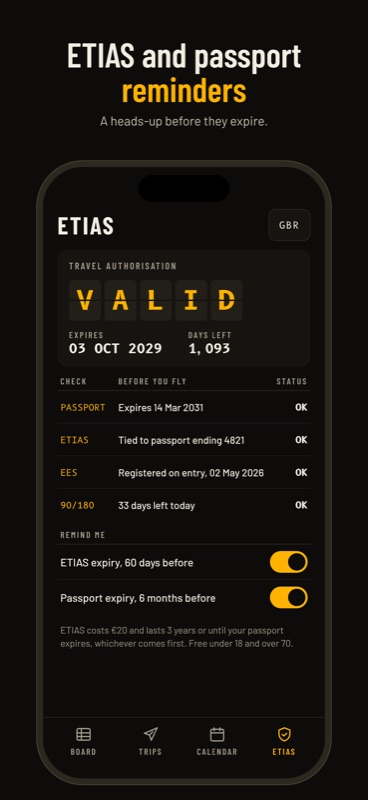
Record your ETIAS, EES entry and passport expiry. Gate 90 shows the effective ETIAS expiry (the earliest of its own expiry, three years, or your passport) and a pre-flight checklist.

📱 Widgets and Reminders

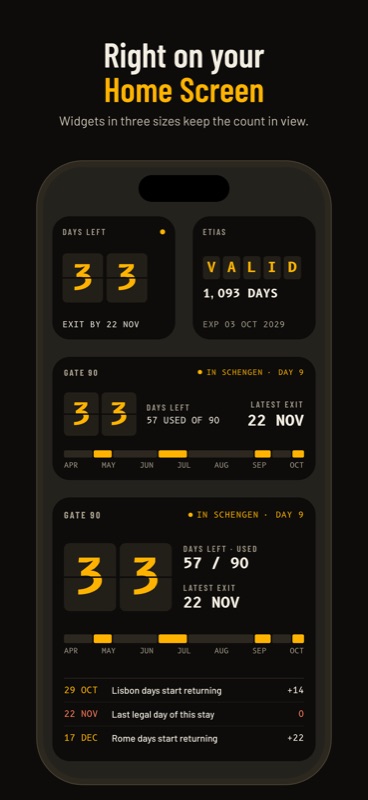
Days left on the Home Screen and Lock Screen. Reminders when you run low, on your last legal day, and before your ETIAS or passport expires.

👨‍👩‍👧 Every Traveller

A separate count for each passport in the family, and private iCloud sync across your iPhone and iPad.

🔒 Private and Offline

No account, no analytics, no ads. Only the last four passport characters are ever stored, never the full number. The calculator works without a connection.

Screenshots

See It in Action

Under the Hood

Built With

Swift SwiftUI SwiftData CKSyncEngine WidgetKit UserNotifications StoreKit 2

A shared Gate90Core Swift package holds date-only values, trip validation, the calculator, document states, reminder planning and widget snapshots. Each day is a Gregorian ordinal, so past trips never shift when you change time zones. The calculator is checked against 100 generated trip histories and an independent day-by-day count.

Trips live in SwiftData, with opt-in sync on CKSyncEngine in a private CloudKit zone, deterministic conflict resolution and deletion tombstones. WidgetKit reads a privacy-filtered snapshot from the App Group, reminders are planned locally, and Pro is verified with StoreKit 2. Fonts are Barlow, Barlow Condensed and B612 Mono. No third-party dependencies.


Pricing

Free to Start

Free

  • ✓ One traveller
  • ✓ Unlimited trips
  • ✓ Days left and latest exit
  • ✓ Forecast calendar
  • ✓ ETIAS, EES and passport records

Pro

  • ✓ Home Screen and Lock Screen widgets
  • ✓ Low-days and last-legal-day alerts
  • ✓ ETIAS and passport expiry reminders
  • ✓ Multiple travellers
  • ✓ Private iCloud sync

Yearly subscription or a one-time lifetime purchase. If Pro ends, all your data stays.

The calculator is free and complete. Pro is for frequent travellers and families.

Privacy

Your Trips. Your Data.

Trips and documents stay on your device and, if you turn on sync, in your own private iCloud. No full passport numbers, no account, no analytics, no ads. The app makes no network requests of its own.

Support

Questions?

Have feedback, questions, or need help? I'd love to hear from you:

[email protected]

Fullscreen Screenshot